
什么是SQL语句?
SQL,英文全称为Structured Query Language,中文意思是结构化查询语言(属于编程语言);
它是一种对关系数据库中的数据进行定义和操作的语言,是大多数关系数据库管理系统所支持的工业标准语言。
在使用SQL语句时,也会用到几种常用的标准:SQL 89 /SQL 92 /SQL 99 /SQL 03
在企业实际应用过程,还会根据SQL语言操作的方式,细化为四种类型:DDL、DCL、DML
DDL
概念介绍:
DDL Data Definition Language(数据定义语言),负责管理数据库的基础数据(不会对表的内容修改),比如增删库、增删表、增删索引、增删用户等;
涉及语句:
==CREATE==(创建)、==ALTER==(修改)、==DROP==(删除)等;
关注人群:
运维人员和开发人员都要熟悉。
相关具体的DDL负责的操作行为,可以执行以下命令进行查看:
mysql> ? Data Definition;
You asked for help about help category: "Data Definition"
For more information, type 'help <item>', where <item> is one of the following
topics:
   ALTER DATABASE
   ALTER EVENT
   ALTER FUNCTION
   ALTER INSTANCE
   ALTER LOGFILE GROUP
   ALTER PROCEDURE
   ALTER SCHEMA
   ALTER SERVER
   ALTER TABLE
   ALTER TABLESPACE
   ALTER VIEW
   CREATE DATABASE
   CREATE EVENT
   CREATE FUNCTION
   CREATE INDEX
   CREATE LOGFILE GROUP
   CREATE PROCEDURE
   CREATE SCHEMA
   CREATE SERVER
   CREATE SPATIAL REFERENCE SYSTEM
   CREATE TABLE
   CREATE TABLESPACE
   CREATE TRIGGER
   CREATE VIEW
   DROP DATABASE
   DROP EVENT
   DROP FUNCTION
   DROP INDEX
   DROP PROCEDURE
   DROP SCHEMA
   DROP SERVER
   DROP SPATIAL REFERENCE SYSTEM
   DROP TABLE
   DROP TABLESPACE
   DROP TRIGGER
   DROP VIEW
   FOREIGN KEY
   RENAME TABLE
   TRUNCATE TABLE
数据库相关
数据库规范说明
- 创建数据库名称规范:要和业务有关,不要大写字母(为了多平台兼容),不要数字开头,不要含有系统关键字信息;
- 创建数据库明确字符:创建数据库时明确(显示)的设置字符集信息,为了避免跨平台兼容性与不同版本兼容性问题;
- 删除数据库操作慎用:在对数据库进行删除操作时,一定要经过严格审计后再进行操作,并且数据库普通用户不能有drop权限;
- 创建数据库
mysql> create database db01 charset utf8 collate utf8_general_mysql500_ci;
- 查看数据库
# 查看含有所有db数据库信息
mysql> show databases like '%db%';
+-----------------+
| Database (%db%) |
+-----------------+
| db01            |
+-----------------+
1 row in set (0.00 sec)

# 检索指定数据库的语句信息
mysql> show create database db01;
+----------+----------------------------------------------------------------------------+
| Database | Create Database                                                            |
+----------+----------------------------------------------------------------------------+
| db01     | CREATE DATABASE `db01` /*!40100 DEFAULT CHARACTER SET utf8mb4 COLLATE utf8mb4_0900_ai_ci */ /*!80016 DEFAULT ENCRYPTION='N' */ |
+----------+----------------------------------------------------------------------------+
1 row in set (0.00 sec)
| 数据库名称 | 作用说明 |
|---|---|
| information_schema | 系统运行状态,性能等的库 |
| mysql | 授权权限、用户管理的库 |
| performance_schema | 系统运行状态,性能等的库 |
说明:以上三个是数据库系统中默认的数据库,可以用于管理应用。
- 修改数据库信息
mysql> alter database db01 charset utf8;
mysql> alter database db01 charset utf8 collate utf8_general_mysql500_ci;
- 删除数据库信息
mysql> drop database test;
- 切换数据库信息
mysql> use db02;
mysql> select database();
+------------+
| database() |
+------------+
| db02       |
+------------+
1 row in set (0.00 sec)
表相关
数据表规范说明:
-
创建数据表名称规范:要和业务有关(含库前缀),不要有大写字母,不要数字开头,不要含有系统关键字信息,名称不要太长;
-
创建数据表属性规范:属性信息显示设置,引擎选择InnoDB,字符集选择utf8/utf8mb4,表信息添加注释;
-
创建数据列属性规范:名称要有意义,不要含有系统关键字信息,名称不要太长;
-
创建数据类型的规范:数据类型选择合适的、足够的、简短的;
-
创建数据约束的规范:每个表中必须都要有主键,最好是和业务无关列,实现自增功能,建议每个列都非空(避免索引失效)/加注释
-
删除数据表操作规范:对于普通用户不能具有删表操作,需要操作删表时需要严格审核
-
修改数据表结构规范:在数据库8.0之前,修改数据表结构需要在业务不繁忙时进行,否则会产生严重的锁
如果出现紧急修改表结构信息需求时,可以使用工具进行调整,比如使用:pt-osc、gh-ost,从而降低对业务影响
- 创建表
# 创建表的基本语法格式
create table <表名> (
     <字段名1> <类型1> ,
    …
    <字段名n> <类型n>);
CREATE TABLE `student` (
  `id` int NOT NULL COMMENT '学号信息',
  `name` varchar(45) NOT NULL COMMENT '学生名',
  `age` tinyint unsigned NOT NULL COMMENT '学生年龄',
  `gender` enum('M','F','N') NOT NULL DEFAULT 'N' COMMENT '学生性别',
  PRIMARY KEY (`id`)
) ENGINE=InnoDB DEFAULT CHARSET=utf8mb4 COLLATE=utf8mb4_0900_ai_ci COMMENT='学生表'
以上是创建表的具体格式信息,其中create table是关键字,不能更改,但是大小写可以变化。
- 修改表
# 修改数据表名称信息,以下两种方式
mysql> rename table stu1 to stu2;
mysql> alter table stu2 rename stu3;

# 修改数据库编码信息
mysql> alter table stu1 charset utf8mb4;

# 利用alter在数据库中添加新的表结构字段
mysql> alter table <表名> add column <字段名称> <数据类型> <约束与属性> [comment '注释'] [选项参数]

# 利用alter在数据库中删除已有表结构字段
mysql> alter table <表名> drop column <字段名称>

# 利用alter在数据库中修改已有表结构字段(数据类型 约束与属性)
mysql> alter table <表名> modify column <字段名称> <数据类型> <约束与属性> [comment '注释'] [选项参数]

# 利用alter在数据库中修改已有表结构字段(字段名称 数据类型 约束与属性)
mysql> alter table <表明> change column <旧字段名称> <新字段名称> <数据类型> <约束与属性> [comment '注释'] [选项参数]

# 利用alter在数据库中删除索引
mysql > alter table <表名> drop index <字段名称> ;

# 具体实际操作过程(添加新的表结构字段)
# 在学生表中,添加新的表结构字段列(追加字段列-单列操作)
mysql > alter table stu add column telno char(11) not null unique key comment '手机号';

# 在学生表中,添加新的表结构字段列(插入字段列-单列操作)
mysql > alter table stu add column wechat varchar(64) not null unique key comment '微信号' after age;

# 在学生表中,添加新的表结构字段列(插入首行列-单列操作)
mysql > alter table stu add column sid int not null unique key comment '微信号' first;
查看表结构字段信息变化
mysql > desc stu;

# 具体实际操作过程(删除已有表结构字段)
# 在学生表中,删除已有表结构字段列(删除指定字段列-单列操作)
mysql > alter table stu drop column sid;

# 具体实际操作过程(修改已有表结构字段)
# 在学生表中,修改已有表结构字段列(修改表结构数据类型)
mysql > alter table stu modify name varchar(64);

# 在学生表中,修改已有表结构字段列,最后带有保持原有配置的属性信息,否则其他属性信息会被还原为默认
mysql > alter table stu modify name varchar(64) not null comment '学生名';

# 在学生表中,修改已有表结构字段列(修改表结构字段名称)
mysql > alter table stu change name stuname varchar(64) not null comment '学生名';
或者
mysql > alter table stu change column name stuname varchar(64) not null comment '学生名';

# 在学生表中,修改已有表结构字段列(修改表结构属性信息)了解即可
mysql > alter table stu modify name varchar(64) not null unique comment '学生名称';

# 在学生表中,修改已有表结构字段列(删除表结构属性信息)了解即可
mysql > alter table stu drop index `name`;

# -- 查看表结构字段信息变化
mysql > desc stu;
- 查看表
# 查看所有表
mysql> show tables;

# 查看表结构
mysql> desc class;

# 查看数据库中指定表创建语句信息
mysql> show create table class;
- 删除表
# 删除表(表结构和表中数据内容一并删除)
mysql> drop table <表明>;

# 清空表中的数据,但保留定义的表结构信息
mysql> truncate table stu1;
mysql> delete table stu1;
DCL
概念介绍:
DCL Data Control Language(数据控制语言),主要用来定义访问权限和安全级别
涉及语句:
==GRANT==(用户授权)、==REVOKE==(权限回收)、==COMMIT==(提交)、==ROLLBACK==(回滚)
关注人群:
运维人员需要熟练
相关具体的DCL负责的操作行为,可以执行以下命令进行查看:
mysql> ? Account Management
You asked for help about help category: "Account Management"
For more information, type 'help <item>', where <item> is one of the following
topics:
   ALTER RESOURCE GROUP
   ALTER USER
   CREATE RESOURCE GROUP
   CREATE ROLE
   CREATE USER
   DROP RESOURCE GROUP
   DROP ROLE
   DROP USER
   GRANT
   RENAME USER
   REVOKE
   SET DEFAULT ROLE
   SET PASSWORD
   SET RESOURCE GROUP
   SET ROLE
DML
概念介绍:
DML Data Manipulation Language(数据操作语言),主要针对数据库里的表里的数据进行操作,用来定义数据库记录(数据);
涉及语句:
==SELECT==(查)、==INSERT==(增)、==DELETE==(删)、==UPDATE==(改)
关注人群:
开发人员要熟练,运维人员熟悉即可
相关具体的DML负责的操作行为,可以执行以下命令进行查看:
mysql> ? Data Manipulation;
You asked for help about help category: "Data Manipulation"
For more information, type 'help <item>', where <item> is one of the following
topics:
   CALL
   DELETE
   DO
   DUAL
   EXCEPT
   HANDLER
   IMPORT TABLE
   INSERT
   INSERT DELAYED
   INSERT SELECT
   INTERSECT
   JOIN
   LOAD DATA
   LOAD XML
   PARENTHESIZED QUERY EXPRESSIONS
   REPLACE
   SELECT
   TABLE
   UNION
   UPDATE
   VALUES STATEMENT
表中插入
mysql> insert into <表名> [( <字段名1>[,..<字段名n > ])] values ( 值1 )[, ( 值n )];
实操:
mysql> show create table test;
+-------+-------------------------------------------------------------------------------+
| Table | Create Table                                                                  |
+-------+-------------------------------------------------------------------------------+
| test  | CREATE TABLE `test` (
  `id` int NOT NULL AUTO_INCREMENT,
  `name` varchar(10) COLLATE utf8mb3_general_mysql500_ci NOT NULL,
  `age` tinyint unsigned NOT NULL,
  `dept` enum('Linux','net','go') COLLATE utf8mb3_general_mysql500_ci NOT NULL DEFAULT 'Linux',
  PRIMARY KEY (`id`)
) ENGINE=InnoDB DEFAULT CHARSET=utf8mb3 COLLATE=utf8mb3_general_mysql500_ci |
+-------+-------------------------------------------------------------------------------+
1 row in set (0.01 sec)

mysql> desc test;
+-------+--------------------------+------+-----+---------+----------------+
| Field | Type                     | Null | Key | Default | Extra          |
+-------+--------------------------+------+-----+---------+----------------+
| id    | int                      | NO   | PRI | NULL    | auto_increment |
| name  | varchar(10)              | NO   |     | NULL    |                |
| age   | tinyint unsigned         | NO   |     | NULL    |                |
| dept  | enum('Linux','net','go') | NO   |     | Linux   |                |
+-------+--------------------------+------+-----+---------+----------------+
4 rows in set (0.00 sec)


mysql> insert into test(id,name,age,dept) values(1,'zzp',35,'Linux');
Query OK, 1 row affected (0.01 sec)
mysql> select * from test;
+----+------+-----+-------+
| id | name | age | dept  |
+----+------+-----+-------+
|  1 | zzp  |  35 | Linux |
+----+------+-----+-------+
1 row in set (0.00 sec)
# 插入单行信息标准方法(信息输入不要重复,且特定信息不要为空)
mysql> insert into test(id,name,age,dept) values(1,'zzp',18,'go');
ERROR 1062 (23000): Duplicate entry '1' for key 'test.PRIMARY'

# 插入单行信息标准方法(自增列信息可以填入0或null,表示默认实现自增效果)
mysql> insert into test(id,name,age,dept) values(0,'zzp',19,'go');
mysql> insert into test(id,name,age,dept) values(null,'zzp',34,'net');
mysql> select * from test;
+----+------+-----+-------+
| id | name | age | dept  |
+----+------+-----+-------+
|  1 | zzp  |  35 | Linux |
|  2 | zzp  |  19 | go    |
|  3 | zzp  |  34 | net   |
+----+------+-----+-------+
3 rows in set (0.00 sec)

# 插入单行信息可以不含有表字段信息
mysql> insert into test values(null,'zzp',66,'Linux');
Query OK, 1 row affected (0.00 sec)
mysql> select * from test;
+----+------+-----+-------+
| id | name | age | dept  |
+----+------+-----+-------+
|  1 | zzp  |  35 | Linux |
|  2 | zzp  |  19 | go    |
|  3 | zzp  |  34 | net   |
|  4 | zzp  |  66 | Linux |
+----+------+-----+-------+
4 rows in set (0.00 sec)

mysql> insert into test values(null,'zzp',88,'net'),(null,'zzp',77,'Linux');
Query OK, 2 rows affected (0.01 sec)
Records: 2  Duplicates: 0  Warnings: 0
mysql> select * from test;
+----+------+-----+-------+
| id | name | age | dept  |
+----+------+-----+-------+
|  1 | zzp  |  35 | Linux |
|  2 | zzp  |  19 | go    |
|  3 | zzp  |  34 | net   |
|  4 | zzp  |  66 | Linux |
|  5 | zzp  |  88 | net   |
|  6 | zzp  |  77 | Linux |
+----+------+-----+-------+
6 rows in set (0.00 sec)

# 插入当行信息可以只含部分字段信息,但是省略字段信息必须具有自增特性 或 可以为空 或有默认值输入
mysql> insert into test(name,age) values('zzp',22);
Query OK, 1 row affected (0.01 sec)
mysql> select * from test;
+----+------+-----+-------+
| id | name | age | dept  |
+----+------+-----+-------+
|  1 | zzp  |  35 | Linux |
|  2 | zzp  |  19 | go    |
|  3 | zzp  |  34 | net   |
|  4 | zzp  |  66 | Linux |
|  5 | zzp  |  88 | net   |
|  6 | zzp  |  77 | Linux |
|  7 | zzp  |  22 | Linux |
+----+------+-----+-------+
7 rows in set (0.00 sec)
表中更新
# 属于表内容信息变更操作,需要按照表结构预先定义好的字段信息修改,并且按照条件修改,默认全表修改
mysql> update 表名 set 字段=新值,… where 条件;
实操:
mysql> select * from test;
+----+------+-----+-------+
| id | name | age | dept  |
+----+------+-----+-------+
|  1 | zzp  |  35 | Linux |
|  2 | zzp  |  19 | go    |
|  3 | zzp  |  34 | net   |
|  4 | zzp  |  66 | Linux |
|  5 | zzp  |  88 | net   |
|  6 | zzp  |  77 | Linux |
|  7 | zzp  |  22 | Linux |
+----+------+-----+-------+
7 rows in set (0.00 sec)

mysql> update test set name='zhangsan' where id=1;
Query OK, 1 row affected (0.00 sec)
Rows matched: 1  Changed: 1  Warnings: 0

mysql> select * from test;
+----+----------+-----+-------+
| id | name     | age | dept  |
+----+----------+-----+-------+
|  1 | zhangsan |  35 | Linux |
|  2 | zzp      |  19 | go    |
|  3 | zzp      |  34 | net   |
|  4 | zzp      |  66 | Linux |
|  5 | zzp      |  88 | net   |
|  6 | zzp      |  77 | Linux |
|  7 | zzp      |  22 | Linux |
+----+----------+-----+-------+
7 rows in set (0.00 sec)
**知识拓展:**禁止修改命令不加条件信息执行命令:
==服务端==禁止不带where条件操作数据库表有两种方法:
利用sql_safe_updates配置参数,表示在delete,update操作中:
没有where条件,当where条件中列没有索引可用,且无limit限制时会拒绝更新。
# 方法1:临时执行
mysql> set global sql_safe_updates=1;
-- 退出重新登陆生效
mysql> update stu set name='zzp';
ERROR 1175 (HY000): You are using safe update mode and you tried to update a table without a WHERE that uses a KEY column.
-- 配置效果展示

# 方法2:永久生效
[root@db01 ~]# vi /etc/my.cnf
[mysqld]
init-file=/opt/init.sql
-- 新建脚本
echo 'set global sql_safe_updates=1;' >/opt/init.sql
chmod +x /opt/init.sql
/etc/init.d/mysqld restart
[root@db01 ~]# mysql -uroot -poldboy123 -e "select @@global.sql_safe_updates"
+-------------------------------------+
| @@global.sql_safe_updates           |
+-------------------------------------+
| 1                                   |
+-------------------------------------+
==客户端==禁止不带where条件操作数据库表有两种方法:
# 方法一:把safe_updates=1加入到my.cnf的client标签下
[root@db01 ~]# vim /etc/my.cnf
[mysql]
socket=/tmp/mysql.sock
safe_updates=1
-- 客户端配置信息
mysql> update stu set sname='oldboy01';
ERROR 1175 (HY000): You are using safe update mode and you tried to update a table without a WHERE that uses a KEY column.
-- 配置效果展示

# 方法2:设置数据库别名操作方式
alias mysql='mysql -U'
-U, --safe-updates  Only allow UPDATE and DELETE that uses keys
-- 表示以安全更新模式登录数据库,并放入/etc/profile永久生效。
mysql> update stu set sname='oldboy03';
ERROR 1175 (HY000): You are using safe update mode and you tried to update a table without a WHERE that uses a KEY column.
-- 配置效果展示
表中删除
# 属于表内容信息变更操作,需要按照表结构预先定义好的字段信息删除,并且按照条件删除,默认全表删除
mysql> delete from 表名 where 表达式;
删除表信息时,如果不加条件会进行逐行删除全表信息(效率比较慢)
实操
mysql> select * from test;
+----+----------+-----+-------+
| id | name     | age | dept  |
+----+----------+-----+-------+
|  1 | zhangsan |  35 | Linux |
|  2 | zzp      |  19 | go    |
|  3 | zzp      |  34 | net   |
|  4 | zzp      |  66 | Linux |
|  5 | zzp      |  88 | net   |
|  6 | zzp      |  77 | Linux |
|  7 | zzp      |  22 | Linux |
+----+----------+-----+-------+
7 rows in set (0.00 sec)

mysql> delete from test where id>6;
Query OK, 1 row affected (0.00 sec)

mysql> delete from test where id<4;
Query OK, 3 rows affected (0.00 sec)

mysql> delete from test where id=4 or age=5;
Query OK, 1 row affected (0.00 sec)

mysql> select * from test;
+----+------+-----+-------+
| id | name | age | dept  |
+----+------+-----+-------+
|  5 | zzp  |  88 | net   |
|  6 | zzp  |  77 | Linux |
+----+------+-----+-------+
2 rows in set (0.00 sec)

mysql> delete from test;
Query OK, 2 rows affected (0.00 sec)

mysql> select * from test;
Empty set (0.00 sec)
知识拓展:
由于执行删除语句信息时,有可能会对一些业务数据造成影响,甚至可能会将表中所有数据清空,虽然可以通过日志信息恢复(闪回)
但是整体操作过程还是比较危险的,因此在进行数据信息删除操作时,可以利用伪删除操作代替真实删除操作;
一般在数据库中删除数据信息,是因为从业务层面有些数据不想被查询获取到,伪删除就是不让查询时可以获取想要删除的数据;
==伪删除的本质:利用update替代delete==
可以在相应表中添加状态列信息,可以将状态列设置为:1表示存在 0表示不存在
在进行伪删除操作时,只是将状态列信息改为0,但是并没有把相应行的数据信息删除,但是在查询时可以忽略状态列为0的信息;
这样可以有效规避误删除操作对业务数据的影响,万一伪删除操作有问题,可以再将状态列信息0改为1即可
# 真实删除数据信息操作举例
mysql> delete from stu1 where id=6;

# 伪删除数据信息操作举例
mysql> alter table stu1 add state tinyint not null default 1;
-- 在原有表中添加新的状态列
mysql> update stu1 set state=0 where id=6;
-- 将原本删除列信息的状态改为0,实现伪删除效果
mysql> select * from stu1 where state=1;
-- 实现查询时不要获取状态为0的信息,即不查看获取伪删除数据信息
DQL
概念介绍:
主要用来查询记录(数据)
说明:此类型是个人自定义的
涉及语句:
==SELECT==(查)
基本结构是由SELECT子句,FROM子句,WHERE子句组成的查询块
关注人群:
运维人员和开发人员都要熟悉。
查询获取服务配置信息
mysql> select @@配置参数信息
mysql> show variables like '检索的配置信息'
实操
------------------变量查找---------------------
# 查询端口配置信息
mysql> select @@port;
+--------+
| @@port |
+--------+
|   3306 |
+--------+
1 row in set (0.00 sec)

# 查询套接字文件
mysql> select @@socket;
+-----------------+
| @@socket        |
+-----------------+
| /tmp/mysql.sock |
+-----------------+
1 row in set (0.00 sec)

------------------模糊查找---------------------
# 查看数据库服务所有配置参数信息
mysql> show variables;

# 查看数据库服务配置信息模糊查找(查找po开头的信息)
mysql> show variables like 'po%';

# 查看数据库服务配置信息模糊查找(查找po结尾的信息)
mysql> show variables like '%po';

# 查看数据库服务配置信息模糊查找(查找含有po的信息)
mysql> show variables like '%po%';


# 查询数据库服务函数输出信息,获取服务版本信息
mysql> select version();
+-----------+
| version() |
+-----------+
| 8.0.26    |
+-----------+
1 row in set (0.00 sec)

# 查询数据库服务函数输出信息,获取当前日期时间
mysql> select now();
+--------------------------+
| now()                    |
+--------------------------+
| 2022-11-04 09:13:27 |
+--------------------------+
1 row in set (0.00 sec)

# 查询数据库服务函数输出信息,获取拼接函数信息
mysql> select concat(123);
+-----------------+
| concat(123)     |
+-----------------+
| 123             |
+-----------------+
1 row in set (0.00 sec)

# 拼接函数应用演示
mysql> select concat(user,"@","'",host,"'") from mysql.user;
+-------------------------------------+
| concat(user,"@","'",host,"'")       |
+-------------------------------------+
| user02@'%'                          |
| blog@'192.168.30.%'                 |
+-------------------------------------+
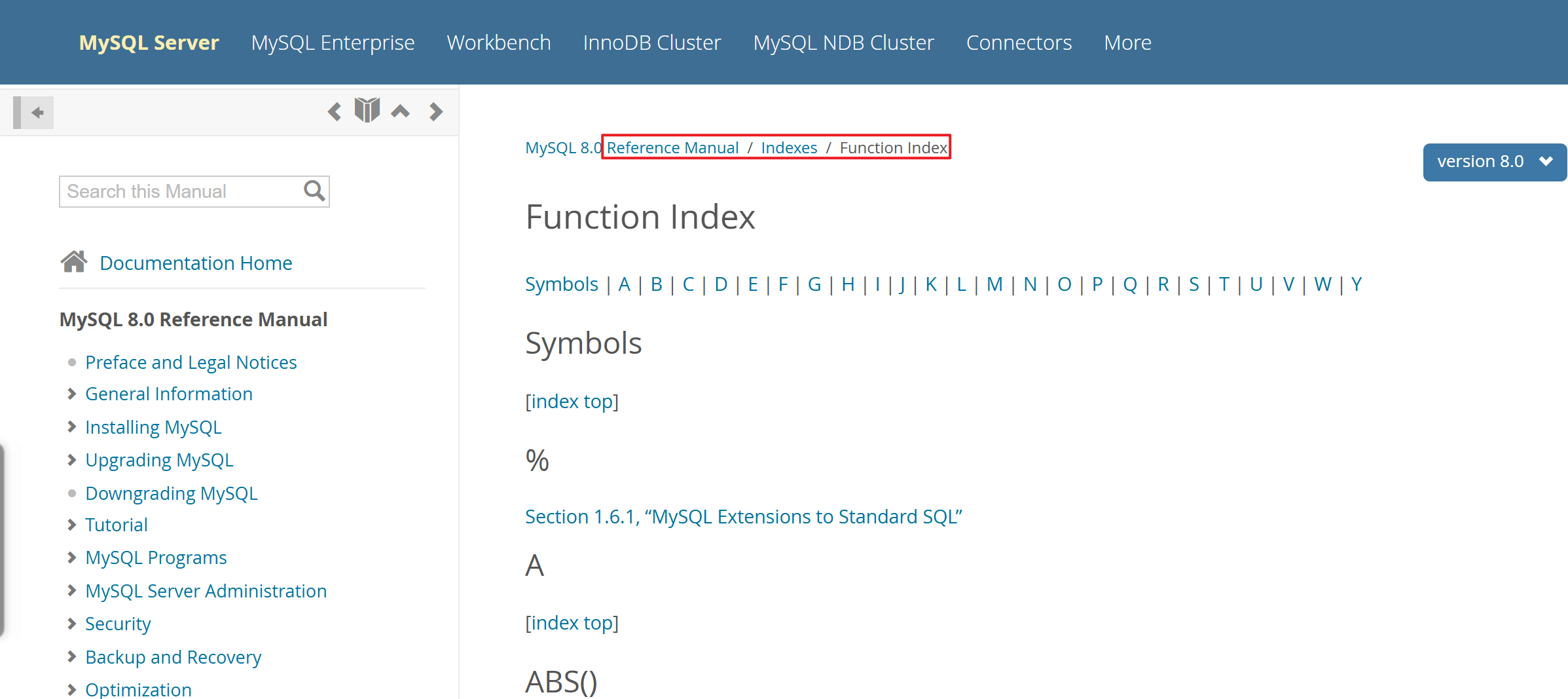
更多函数:MySQL :: MySQL 8.0 Reference Manual :: Function Index
在线调整配置参数
# 数据库配置参数在线调整
mysql > set session innodb_flush_log_at_trx_commit=1;

# 表示在线临时调整配置参数,并且只是当前会话生效(session是默认方式,不是所有配置都可以调整)
mysql > set sql_log_bin=0;

# 表示在线临时调整配置参数,并且将会影响所有连接(global是全局方式,可以进行所有配置调整)
mysql > set global innodb_flush_log_at_trx_commit=1;
说明:数据库服务配置参数在线调整参数,只是临时生效,数据库服务重启后配置会失效,想要永久生效需要修改配置文件信息
上传加载测试环境:
# 官方数据库测试样例文件下载:https://dev.mysql.com/doc/index-other.html
curl -L https://downloads.mysql.com/docs/world-db.tar.gz -C - -o world-db.tar.gz
source ~/world-db/world-db.sql   # 导入数据
mysql> show databases;
+--------------------+
| Database           |
+--------------------+
| db01               |
| db02               |
| db03               |
| information_schema |
| mysql              |
| performance_schema |
| sys                |
| world              |
+--------------------+
8 rows in set (0.00 sec)

mysql> show tables from world;
+-----------------+
| Tables_in_world |
+-----------------+
| city            |
| country         |
| countrylanguage |
+-----------------+
3 rows in set (0.00 sec)
单表查询
# 数据表数据查询命令语法
mysql> select <字段1,字段2,...> from <表名> [WHERE 条件] group by <字段1,字段2,...> having 条件 order by 字段 limit 限制信息;
==select + from结合使用情况==
mysql> use world;
mysql> select * from city;
mysql> select id,name,countrycode,district,population from city;
mysql> select name,population from city;
==select + from + where结合使用情况==
方式一:定义等值条件信息进行数据查询
# 查询中国的所有城市信息,中国代码信息“CHN”
mysql> select * from city where countrycode='CHN';

# 查询中国的所有城市信息,只关注城市名称和人口数量列信息
mysql> select name,population from city where countrycode='CHN';
方式二:定义区间条件信息进行数据查询
可使用区间条件表示方法:
| 符号 | 解释说明 |
|---|---|
| < | 表示小于指定数值的信息作为条件 |
| > | 表示大于指定数值的信息作为条件 |
| <= | 表示小于等于指定数值的信息作为条件 |
| >= | 表示大于等于指定数值的信息作为条件 |
| != / <> | 表示不等于指定数值的信息作为条件 |
# 查询大于700万人的所有城市信息
mysql > SELECT * FROM city WHERE population>7000000;

# 查询小于等于1000人的所有城市信息
mysql > SELECT * FROM city WHERE population<=1000;
方式三:定义逻辑条件信息进行数据查询
可以使用逻辑判断符号,进行条件设定查找相应数据信息:
| 逻辑判断符号 | 解释说明 |
|---|---|
| and(并且)/ && | 表示多个条件均都满足才能被查找出来 |
| or(或者)/ || | 表示多个条件之一满足就能被查找出来 |
| not (取反) / ! | 表示查找除过滤查找的信息以外的内容 |
# 查询中国境内,大于520万人口的城市信息
mysql> SELECT * FROM city WHERE countrycode='CHN' AND population>5200000;

# 查询中国和美国的所有城市
mysql> SELECT * FROM city WHERE countrycode='chn' OR countrycode='USA';

# 查询人口数在100w到200w之间的城市信息
mysql> SELECT * FROM city WHERE population>=1000000 AND population<=2000000;
方式四:定义模糊条件信息进行数据查询(like )
# 查询国家代号是CH开头的城市信息
mysql> SELECT * FROM city WHERE countrycode LIKE 'CH%';

# 查询国家代号含US内容的城市信息
mysql> SELECT * FROM city WHERE countrycode LIKE '%US%';
-- 在模糊查询时,%符号在前面进行检索数据时,是不会走索引信息进行检索的,查询性能较慢
方式五:特殊查询条件组合进行数据查询(配合in, not in, between and )
# 查询中国和美国的所有城市
mysql> SELECT * FROM city WHERE countrycode in ('CHN','USA');
-- in的查询条件方式表示包含意思,实际应用更广泛

# 查询世界上的所有城市信息,但排除中国和美国的城市不查询
mysql> SELECT * FROM city WHERE countrycode not in ('CHN','USA');
-- not in的查询条件方式表示排除意思,实际应用比较少见,因为not in不能走索引扫描,查询检索性能较慢

# 查询人口数量在50w-100w之间的城市信息
mysql> SELECT * FROM city WHERE population between 500000 and 10000000;
-- between and的查询条件方式是包含边界取值信息的,即包含50w人口的城市,也包含100w人口的城市
方式六:查询数据信息取消重复信息(distinct)
mysql> select CountryCode from city where CountryCode='USA';
mysql> select Distinct CountryCode from city where CountryCode='USA';
+-----------------+
| CountryCode     |
+-----------------+
| USA             |
+-----------------+
1 row in set (0.19 sec)
-- 列字段信息必须完全相同内容,才可以实现去重;
方式七:查询数据信息为空的内容(is null)
# 查询国家编码字段为空的信息
mysql> select * from city where CountryCode is null;

# 查询国家编码字段为非空的信息
mysql> select * from city where CountryCode not null;
实际操作命令演示:select+from+where+group by+聚合函数(统计函数) 结合使用情况
在利用select语句查询数据信息,结合group by子句可以实现分组查询,并且还必须配合聚合函数对分组查询的数据做相应处理;
数据库服务中常用的==聚合函数==(统计函数):
| 函数信息 | 解释说明 |
|---|---|
| count() | 此函数表示对数量信息进行统计 |
| sum() | 此函数表示对数值信息进行求和 |
| avg() | 此函数表示对数值信息进行求平均值 |
| min() | 此函数表示对数值信息进行取最小值 |
| max() | 此函数表示对数值信息进行取最大值 |
| group_concat() | 此函数表示输出信息无法匹配分组和聚合函数时,进行拼接整合显示 |
| distinct | 此指令表示作用是对表中的单个字段或多个字段去重操作 |
利用group by进行分组查询的执行逻辑分析:
- 根据查询语句信息,取出表中关注的列字段信息;
- 根据查询分组信息,将特定列字段信息进行排序,从而将分组的一致信息整合在一起(形成结果集);
- 根据分组合并信息,结合使用的聚合函数,进行数值信息运算或统计(生成最终结果);
- 根据分组聚合要求,分组信息输出时必须和分组信息一一对应,但特殊列无法一一对应输出时,可使用group_concat()拼接输出
实际操作命令演示:获取分组数据信息进行聚合函数处理实践:
# 查询统计每个国家的人口总数
mysql > select countrycode,sum(population) from world.city group by countrycode;
-- 根据国家信息分组聚合,在将分组后所有城市的人口数量进行sum求和运算,实现国家信息对应人口总数的1对1关系

# 查询统计每个省份的城市个数
mysql > select district,count(name) from city where countrycode='chn' group by district;

# 查询统计每个省份的城市个数,以及城市名称信息(经常面试题考到)
mysql> select district,count(name),name from city where countrycode='chn' group by district;
ERROR 1055 (42000): Expression 3 of SELECT list is not in GROUP BY clause and contains nonaggregated column 'world.city.Name' which is not functionally dependent on columns in GROUP BY clause; this is incompatible with sql_mode=only_full_group_by
-- 由于数据库sql_mode配置了only_full_group_by,由于输出的name信息不能和district信息实现1对1关系,因此报错
mysql> select district,count(name),group_concat(name) from city where countrycode='chn' group by district;
-- 利用group_concat()就可以实现没有出现在分组和聚合函数中的字段,采取拼接整合方式显示,满足分组1对1关系
实际操作命令演示:select+from+where+group by+聚合函数+having
在利用select语句查询数据信息,结合分组和聚合函数处理之后,可以将输出的信息再进行过滤处理(having);
实际操作命令演示:对分组聚合后数据进行过滤处理
# 查询统计每个国家的人口总数,只显示人口数量超过1个亿的信息
mysql > select countrycode,sum(population) from world.city group by countrycode having sum(population)>100000000;
实际操作命令演示:select+from+where+group by+聚合函数+having+order by
在利用select语句查询数据信息,结合分组和聚合函数处理之后,并且再次经过筛选的数据,按照一定数值规律排序显示信息
实际操作命令演示:
# 查询统计每个国家的人口总数,只显示人口数量超过5千万的信息,并且按照国家人口总数排序显示
mysql > select countrycode,sum(population) from world.city group by countrycode having sum(population)>50000000 order by sum(population);
-- 实现了人口数量从小到大排序(升序/正序)

mysql > select countrycode,sum(population) from world.city group by countrycode having sum(population)>50000000 order by sum(population) desc;
-- 实现了人口数量从大到小排序(降序/逆序)
实际操作命令演示:select+from+where+group by+聚合函数+having+order by+limit
在利用select语句查询数据信息,结合分组和聚合函数处理之后经过筛选的数据,按照一定数值规律排序显示信息,并限制输出内容行数
实际操作命令演示:
# 查询统计每个国家的人口总数,只显示人口数量超过5千万的信息,并且按照国家人口总数从大到小排序,只显示前三名
mysql > select countrycode,sum(population) from world.city group by countrycode having sum(population)>50000000 order by sum(population) desc limit 3;
或者
mysql > select countrycode,sum(population) from world.city group by countrycode having sum(population)>50000000 order by sum(population) desc limit 0,3;
mysql > select countrycode,sum(population) from world.city group by countrycode having sum(population)>50000000 order by sum(population) desc limit 3 offset 0;

# 查询统计每个国家的人口总数,只显示人口数量超过5千万的信息,并且按照国家人口总数从大到小排序,只显示三~五名
mysql > select countrycode,sum(population) from world.city group by countrycode having sum(population)>50000000 order by sum(population) desc limit 2,3;
或者
mysql > select countrycode,sum(population) from world.city group by countrycode having sum(population)>50000000 order by sum(population) desc limit 3 offset 2;
-- 跳过前2名,显示后面的三名数据信息
多表查询
在对数据库中数据信息查询时,有些需求情况要获取的数据信息,是通过多个表的数据信息整合获取到的,就称为多表查询;
查询命令语法格式:
# 笛卡尔乘积连接多表:
select * from t1,t2;

# 内连接查询多表:
select * from t1,t2 where t1.列=t2.列;
select * from t1 [inner] join t2 on t1.列=t2.列;

# 外连接查询多表:左外连接
select * from t1 left join t2 on  t1.列=t2.列;
# 外连接查询多表:右外连接
select * from t1 right join t2 on  t1.列=t2.列;
说明:多表查询的最终目的是将多张表的信息整合为一张大表显示,并将显示的结果信息可以做相应单表的操作处理;
上传加载测试环境:
# 创建多表查询所需模拟数据库和数据表信息
CREATE DATABASE school CHARSET utf8;
USE school;

# 学生表
CREATE TABLE student (
    sno INT NOT NULL PRIMARY KEY AUTO_INCREMENT COMMENT '学号',
    sname VARCHAR(20) NOT NULL COMMENT '姓名',
    sage TINYINT UNSIGNED NOT NULL COMMENT '年龄',
    ssex ENUM('f','m') NOT NULL DEFAULT 'm' COMMENT '性别'
) ENGINE=INNODB CHARSET=utf8;

# 课程表
CREATE TABLE course (
    cno INT NOT NULL PRIMARY KEY COMMENT '课程编号',
    cname VARCHAR(20) NOT NULL COMMENT '课程名字',
    tno INT NOT NULL COMMENT '教师编号'
) ENGINE=INNODB CHARSET=utf8;

# 成绩表
CREATE TABLE sc (
    sno INT NOT NULL COMMENT '学号',
    cno INT NOT NULL COMMENT '课程编号',
    score INT NOT NULL DEFAULT 0 COMMENT '成绩'
) ENGINE=INNODB CHARSET=utf8;

# 老师表
CREATE TABLE teacher (
    tno INT NOT NULL PRIMARY KEY COMMENT '教师编号',
    tname VARCHAR(20) NOT NULL COMMENT '教师名字'
) ENGINE=INNODB CHARSET=utf8;

# 在数据库与数据表中插入模拟数据
INSERT INTO student(sno,sname,sage,ssex)
VALUES
(1,'zhang3',18,'m'),
(2,'zhang4',18,'m'),
(3,'li4',18,'m'),
(4,'wang5',19,'f'),
(5,'zh4',18,'m'),
(6,'zhao4',18,'m'),
(7,'ma6',19,'f'),
(8,'oldboy',20,'m'),
(9,'oldgirl',20,'f'),
(10,'oldp',25,'m');

INSERT INTO teacher(tno,tname)
VALUES
(101,'oldboy'),
(102,'xiaoQ'),
(103,'xiaoA'),
(104,'xiaoB');

INSERT INTO course(cno,cname,tno)
VALUES
(1001,'linux',101),
(1002,'python',102),
(1003,'mysql',103),
(1004,'go',105);

INSERT INTO sc(sno,cno,score)
VALUES
(1,1001,80),
(1,1002,59),
(2,1002,90),
(2,1003,100),
(3,1001,99),
(3,1003,40),
(4,1001,79),
(4,1002,61),
(4,1003,99),
(5,1003,40),
(6,1001,89),
(6,1003,77),
(7,1001,67),
(7,1003,82),
(8,1001,70),
(9,1003,80),
(10,1003,96);
mysql> select * from teacher;
+-----+--------+
| tno | tname  |
+-----+--------+
| 101 | oldboy |
| 102 | xiaoQ  |
| 103 | xiaoA  |
| 104 | xiaoB  |
+-----+--------+
4 rows in set (0.00 sec)

mysql> select * from course;
+------+--------+-----+
| cno  | cname  | tno |
+------+--------+-----+
| 1001 | linux  | 101 |
| 1002 | python | 102 |
| 1003 | mysql  | 103 |
| 1004 | go     | 105 |
+------+--------+-----+
4 rows in set (0.00 sec)

# 多表关联查询
mysql> select * from teacher,course;
+-----+--------+------+--------+-----+
| tno | tname  | cno  | cname  | tno |
+-----+--------+------+--------+-----+
| 104 | xiaoB  | 1001 | linux  | 101 |
| 103 | xiaoA  | 1001 | linux  | 101 |
| 102 | xiaoQ  | 1001 | linux  | 101 |
| 101 | oldboy | 1001 | linux  | 101 |
| 104 | xiaoB  | 1002 | python | 102 |
| 103 | xiaoA  | 1002 | python | 102 |
| 102 | xiaoQ  | 1002 | python | 102 |
| 101 | oldboy | 1002 | python | 102 |
| 104 | xiaoB  | 1003 | mysql  | 103 |
| 103 | xiaoA  | 1003 | mysql  | 103 |
| 102 | xiaoQ  | 1003 | mysql  | 103 |
| 101 | oldboy | 1003 | mysql  | 103 |
| 104 | xiaoB  | 1004 | go     | 105 |
| 103 | xiaoA  | 1004 | go     | 105 |
| 102 | xiaoQ  | 1004 | go     | 105 |
| 101 | oldboy | 1004 | go     | 105 |
+-----+--------+------+--------+-----+
16 rows in set (0.00 sec)
# 默认方式多表查询时,会出现组合乘积效果(4*4=16)
内连接(取交集)
可以基于笛卡尔乘积方式的结果集,将有意义的信息进行展示,并且是基于两张表里的相同含义字段,进行比较后输出相等的结果信息;
内连接查询的简单描述:两个表中有关联条件的行显示出来;
# 比较传统的 SQL92的内连接标准方式
mysql> select * from teacher,course where teacher.tno=course.tno;
+-----+--------+------+--------+-----+
| tno | tname  | cno  | cname  | tno |
+-----+--------+------+--------+-----+
| 101 | oldboy | 1001 | linux  | 101 |
| 102 | xiaoQ  | 1002 | python | 102 |
| 103 | xiaoA  | 1003 | mysql  | 103 |
+-----+--------+------+--------+-----+
3 rows in set (0.00 sec)

# 比较新颖的SQL99的内连接使用方式
mysql> select * from teacher inner join course on teacher.tno=course.tno;
+-----+--------+------+--------+-----+
| tno | tname  | cno  | cname  | tno |
+-----+--------+------+--------+-----+
| 101 | oldboy | 1001 | linux  | 101 |
| 102 | xiaoQ  | 1002 | python | 102 |
| 103 | xiaoA  | 1003 | mysql  | 103 |
+-----+--------+------+--------+-----+
3 rows in set (0.00 sec)
外连接(应用更广泛)
利用外连接查询时,是可以进行性能优化处理的,因为内连接在底层查询时,是逐行进行比较后输出,整体数据查询检索的效率较低;
- 外连接可以细分为:左外连接-left join on
左外连接表示查询数据结构包含:左表所有数据行+右表满足关联条件的行;
# a left join b on a.x = b.x;
-- a表示左表,b表示右表,基于左表a建立关联

mysql> select * from teacher left join course on teacher.tno=course.tno;
+-----+--------+------+--------+------+
| tno | tname  | cno  | cname  | tno  |
+-----+--------+------+--------+------+
| 101 | oldboy | 1001 | linux  |  101 |
| 102 | xiaoQ  | 1002 | python |  102 |
| 103 | xiaoA  | 1003 | mysql  |  103 |
| 104 | xiaoB  | NULL | NULL   | NULL |
+-----+--------+------+--------+------+
4 rows in set (0.00 sec)
-- 包含了左表的所有数据行信息(teacher),包含了右表的关联数据行信息(course)

# 显示差集信息:
mysql> select * from teacher left join course on teacher.tno=course.tno where course.cno is null;
+-----+-------+------+-------+------+
| tno | tname | cno  | cname | tno  |
+-----+-------+------+-------+------+
| 104 | xiaoB | NULL | NULL  | NULL |
+-----+-------+------+-------+------+
1 row in set (0.00 sec)
- 外连接可以细分为:右外连接-right join on
右外连接表示查询数据结构包含:右表所有数据行+左表满足关联条件的行;
# 右连接查询语法
a right join b on a.x = b.x
-- a表示左表,b表示右表,基于右表b建立关联

mysql> select * from teacher right join course on teacher.tno=course.tno;
+------+--------+------+--------+-----+
| tno  | tname  | cno  | cname  | tno |
+------+--------+------+--------+-----+
|  101 | oldboy | 1001 | linux  | 101 |
|  102 | xiaoQ  | 1002 | python | 102 |
|  103 | xiaoA  | 1003 | mysql  | 103 |
| NULL | NULL   | 1004 | go     | 105 |
+------+--------+------+--------+-----+
4 rows in set (0.00 sec)

# 显示差集信息:
mysql> select * from teacher right join course on teacher.tno=course.tno where teacher.tno is null;
+------+-------+------+-------+-----+
| tno  | tname | cno  | cname | tno |
+------+-------+------+-------+-----+
| NULL | NULL  | 1004 | go    | 105 |
+------+-------+------+-------+-----+
1 row in set (0.00 sec)
# 统计zhang3,学习了几门课?
mysql> select count(*)
from student left join
sc on student.sno=sc.sno where sname="zhang3";
+----------+
| count(*) |
+----------+
|        2 |
+----------+
1 row in set (0.00 sec)

# 查询zhang3,学习的课程名称有哪些?
mysql> select sname,count(*),group_concat(cname)
from student join
sc on student.sno=sc.sno join
course on sc.cno=course.cno where sname='zhang3';
+--------+----------+---------------------+
| sname  | count(*) | group_concat(cname) |
+--------+----------+---------------------+
| zhang3 |        2 | linux,python        |
+--------+----------+---------------------+
1 row in set (0.00 sec)

# 查询xiaoA老师教的学生名
mysql> select sname
from teacher join
course on teacher.tno=course.tno join
sc on course.cno=sc.cno join
student on sc.sno=student.sno
where tname="xiaoA";
+---------+
| sname   |
+---------+
| zhang4  |
| li4     |
| wang5   |
| zh4     |
| zhao4   |
| ma6     |
| oldgirl |
| oldp    |
+---------+

# 查询xiaoA老师教课程的平均分?
mysql> select tname,avg(score)
from teacher join
course on teacher.tno=course.tno join
sc on course.cno=sc.cno
where tname="xiaoA";
+-------+------------+
| tname | avg(score) |
+-------+------------+
| xiaoA |    76.7500 |
+-------+------------+
1 row in set (0.00 sec)

# 查询每位老师所教课程的平均分,并按平均分排序?
mysql>  select tname,cname,avg(score)  from teacher join course on teacher.tno=course.tno join sc on course.cno=sc.cno group by teacher.tno,course.cno order by avg(score);
+--------+--------+------------+
| tname  | cname  | avg(score) |
+--------+--------+------------+
| xiaoQ  | python |    70.0000 |
| xiaoA  | mysql  |    76.7500 |
| oldboy | linux  |    80.6667 |
+--------+--------+------------+
3 rows in set (0.00 sec)

# 查询xiaoA老师教的不及格的学生姓名?
mysql> select tname,group_concat(sname) from teacher join  course on teacher.tno=course.tno join  sc on course.cno=sc.cno join  student on sc.
sno=student.sno  where tname="xiaoA" and score<60 group by tname;
+-------+---------------------+
| tname | group_concat(sname) |
+-------+---------------------+
| xiaoA | li4,zh4             |
+-------+---------------------+
1 row in set (0.00 sec)

# 查询所有老师所教学生不及格的信息?
mysql> select tname,group_concat(sname) from teacher join  course on teacher.tno=course.tno join  sc on course.cno=sc.cno join  student on sc.sno=student.sno  where score<60 group by tname;
+-------+---------------------+
| tname | group_concat(sname) |
+-------+---------------------+
| xiaoA | li4,zh4             |
| xiaoQ | zhang3              |
+-------+---------------------+
2 rows in set (0.00 sec)
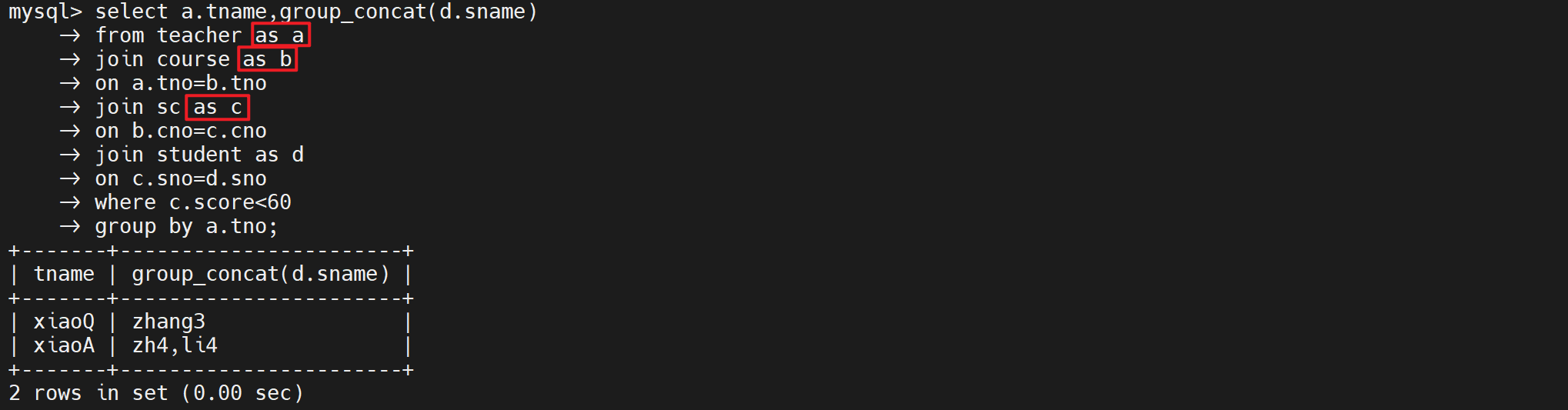
表别名
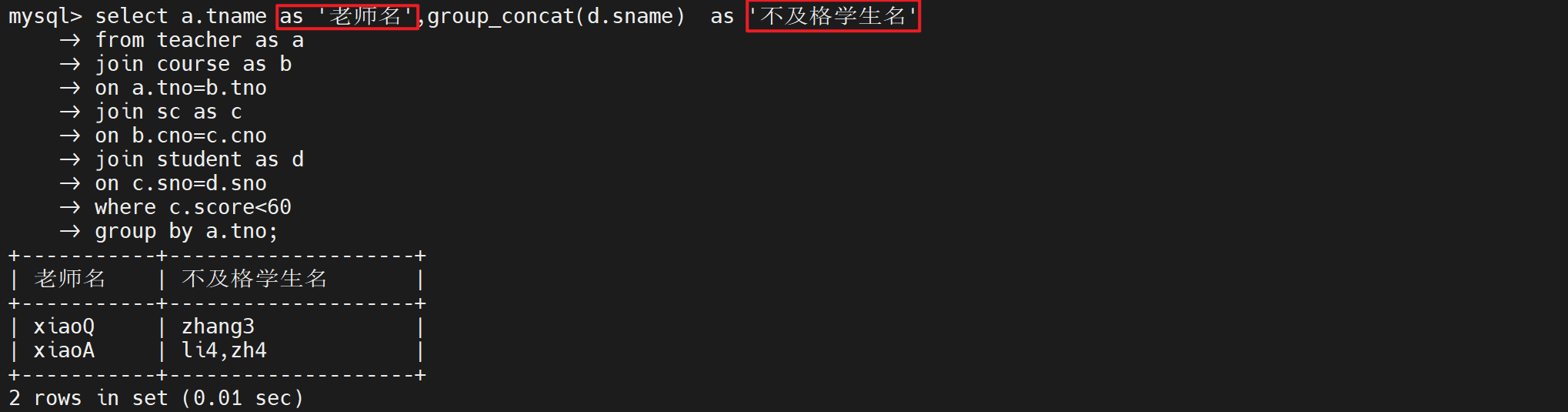
列别名
子查询
select 列名 from 表名 where 列名 > (select avg(列名) from 表名);
实操
- 取出大于linux课程的平均分学生部有哪些;
mysql> select avg(a.score) from sc as a join course as b  on a.cno=b.cno where b.cname='linux';
+--------------+
| avg(a.score) |
+--------------+
|      80.6667 |
+--------------+
1 row in set (0.00 sec)

mysql>
select
  cname,
  sname,
  score
from
  student
  join sc on student.sno = sc.sno
  join course on sc.cno = course.cno
where
  course.cname = 'linux'
  and sc.score & gt;(
    select
      avg(a.score)
    from
      sc as a
      join course as b on a.cno = b.cno
    where
      b.cname = 'linux'
  );
+-------+-------+-------+
| cname | sname | score |
+-------+-------+-------+
| linux | li4   |    99 |
| linux | zhao4 |    89 |
+-------+-------+-------+
2 rows in set (0.00 sec)
- 取出Linux课程成绩大于70分的所有男同学信息:
mysql> select s.sname,s.score from (select sname,score from student join sc on student.sno=sc.sno and ssex='m') as s where s.
score>70;
+--------+-------+
| sname  | score |
+--------+-------+
| zhang3 |    80 |
| zhang4 |    90 |
| zhang4 |   100 |
| li4    |    99 |
| zhao4  |    89 |
| zhao4  |    77 |
| oldp   |    96 |
+--------+-------+
7 rows in set (0.00 sec)